
NGINX(エンジンエックス)の概要
NGINXの概要は以下でまとめています。

Amazon Linux 2023にNGINXをインストール
以下のコマンドをAmazon Linuxで実行してNGINXをインストールした作業証跡をまとめました。
# dnf install nginx実際に実行した実行結果は以下です。都合により、ホスト名のプライベートIPアドレスは*でマスクしています。
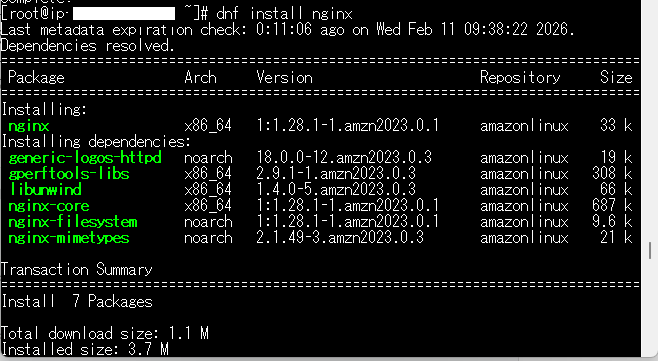
[root@ip-***-***-***-*** ~]# dnf install nginx
Last metadata expiration check: 0:11:06 ago on Wed Feb 11 09:38:22 2026.
Dependencies resolved.
================================================================================
 Package               Arch     Version                     Repository     Size
================================================================================
Installing:
 nginx                 x86_64   1:1.28.1-1.amzn2023.0.1     amazonlinux    33 k
Installing dependencies:
 generic-logos-httpd   noarch   18.0.0-12.amzn2023.0.3      amazonlinux    19 k
 gperftools-libs       x86_64   2.9.1-1.amzn2023.0.3        amazonlinux   308 k
 libunwind             x86_64   1.4.0-5.amzn2023.0.3        amazonlinux    66 k
 nginx-core            x86_64   1:1.28.1-1.amzn2023.0.1     amazonlinux   687 k
 nginx-filesystem      noarch   1:1.28.1-1.amzn2023.0.1     amazonlinux   9.6 k
 nginx-mimetypes       noarch   2.1.49-3.amzn2023.0.3       amazonlinux    21 k

Transaction Summary
================================================================================
Install  7 Packages

Total download size: 1.1 M
Installed size: 3.7 M
Is this ok [y/N]: y
Downloading Packages:
(1/7): generic-logos-httpd-18.0.0-12.amzn2023.0 483 kB/s |  19 kB     00:00
(2/7): libunwind-1.4.0-5.amzn2023.0.3.x86_64.rp 1.5 MB/s |  66 kB     00:00
(3/7): gperftools-libs-2.9.1-1.amzn2023.0.3.x86 5.8 MB/s | 308 kB     00:00
(4/7): nginx-1.28.1-1.amzn2023.0.1.x86_64.rpm   1.2 MB/s |  33 kB     00:00
(5/7): nginx-filesystem-1.28.1-1.amzn2023.0.1.n 412 kB/s | 9.6 kB     00:00
(6/7): nginx-core-1.28.1-1.amzn2023.0.1.x86_64.  15 MB/s | 687 kB     00:00
(7/7): nginx-mimetypes-2.1.49-3.amzn2023.0.3.no 683 kB/s |  21 kB     00:00
--------------------------------------------------------------------------------
Total                                           7.9 MB/s | 1.1 MB     00:00
Running transaction check
Transaction check succeeded.
Running transaction test
Transaction test succeeded.
Running transaction
  Preparing        :                                                        1/1
  Running scriptlet: nginx-filesystem-1:1.28.1-1.amzn2023.0.1.noarch        1/7
  Installing       : nginx-filesystem-1:1.28.1-1.amzn2023.0.1.noarch        1/7
  Installing       : nginx-mimetypes-2.1.49-3.amzn2023.0.3.noarch           2/7
  Installing       : libunwind-1.4.0-5.amzn2023.0.3.x86_64                  3/7
  Installing       : gperftools-libs-2.9.1-1.amzn2023.0.3.x86_64            4/7
  Installing       : nginx-core-1:1.28.1-1.amzn2023.0.1.x86_64              5/7
  Installing       : generic-logos-httpd-18.0.0-12.amzn2023.0.3.noarch      6/7
  Installing       : nginx-1:1.28.1-1.amzn2023.0.1.x86_64                   7/7
  Running scriptlet: nginx-1:1.28.1-1.amzn2023.0.1.x86_64                   7/7
  Verifying        : generic-logos-httpd-18.0.0-12.amzn2023.0.3.noarch      1/7
  Verifying        : gperftools-libs-2.9.1-1.amzn2023.0.3.x86_64            2/7
  Verifying        : libunwind-1.4.0-5.amzn2023.0.3.x86_64                  3/7
  Verifying        : nginx-1:1.28.1-1.amzn2023.0.1.x86_64                   4/7
  Verifying        : nginx-core-1:1.28.1-1.amzn2023.0.1.x86_64              5/7
  Verifying        : nginx-filesystem-1:1.28.1-1.amzn2023.0.1.noarch        6/7
  Verifying        : nginx-mimetypes-2.1.49-3.amzn2023.0.3.noarch           7/7

Installed:
  generic-logos-httpd-18.0.0-12.amzn2023.0.3.noarch
  gperftools-libs-2.9.1-1.amzn2023.0.3.x86_64
  libunwind-1.4.0-5.amzn2023.0.3.x86_64
  nginx-1:1.28.1-1.amzn2023.0.1.x86_64
  nginx-core-1:1.28.1-1.amzn2023.0.1.x86_64
  nginx-filesystem-1:1.28.1-1.amzn2023.0.1.noarch
  nginx-mimetypes-2.1.49-3.amzn2023.0.3.noarch

Complete!
[root@ip-***-***-***-*** ~]#
インストールが完了したNGINXの状態を確認します。
[root@ip-***-***-***-*** ~]# systemctl status nginx
○ nginx.service - The nginx HTTP and reverse proxy server
     Loaded: loaded (/usr/lib/systemd/system/nginx.service; disabled; preset: disabled)
     Active: inactive (dead)
NGINXが停止している状態なので、以下のコマンドを実行してNGINXを起動し、再起動してもNGINXが自動で起動するようにしておきます。
# systemctl start nginx# systemctl enable nginxインストールしたNGINXが動作していることの確認
# systemctl status nginxを実行して実行状態を確認します。
[root@ip-***-***-***-*** ~]# systemctl status nginx
● nginx.service - The nginx HTTP and reverse proxy server
     Loaded: loaded (/usr/lib/systemd/system/nginx.service; enabled; preset: disabled)
     Active: active (running) since Wed 2026-02-11 09:58:04 UTC; 9s ago
   Main PID: 27745 (nginx)
      Tasks: 3 (limit: 1067)
     Memory: 3.2M
        CPU: 53ms
     CGroup: /system.slice/nginx.service
             tq27745 "nginx: master process /usr/sbin/nginx"
             tq27746 "nginx: worker process"
             mq27747 "nginx: worker process"

Feb 11 09:58:04 ip-***-***-***-***.ap-northeast-1.compute.internal systemd[1]: Starting nginx.service - The nginx HTTP and reverse proxy >
Feb 11 09:58:04 ip-***-***-***-***.ap-northeast-1.compute.internal nginx[27743]: nginx: the configuration file /etc/nginx/nginx.conf synt>
Feb 11 09:58:04 ip-***-***-***-***.ap-northeast-1.compute.internal nginx[27743]: nginx: configuration file /etc/nginx/nginx.conf test is >
Feb 11 09:58:04 ip-***-***-***-***.ap-northeast-1.compute.internal systemd[1]: Started nginx.service - The nginx HTTP and reverse proxy s>
[root@ip-***-***-***-*** ~]#
ブラウザからインスタンスのパブリックIPアドレスへアクセスして、NGINXが動作していることが確認できれば完了です。