
この記事では「Oracle Database 21c for Linux x86-64」をOracleLinux8.10にrpmでインストールする方法をまとめました。
Oracle Database 21cのインストールは、以下の2通りのインストール方法があります。
- Zipファイルを解凍してインストールする
- rpmファイルを使用してインストールする
この記事では後者のrpmファイルを利用したインストールを行います。
rpmファイルをダウンロードする
Oracle公式サイトから「Oracle Database 21c for Linux x86-64」のrpmファイルをダウンロードします。

Database Software Downloads
Download the latest Database Software 26ai or all previous versions Windows, Linux Oracle Solaris, IBM AIX, HP-UX and mo...
www.oracle.com
日本語版は以下です。

fw_error_www
www.oracle.com
上記サイトのリンク、以下からrpmファイルを入手します。

Oracle Database 21c Download for Linux x86-64
Oracle Database 21c Download for Linux x86-64
www.oracle.com
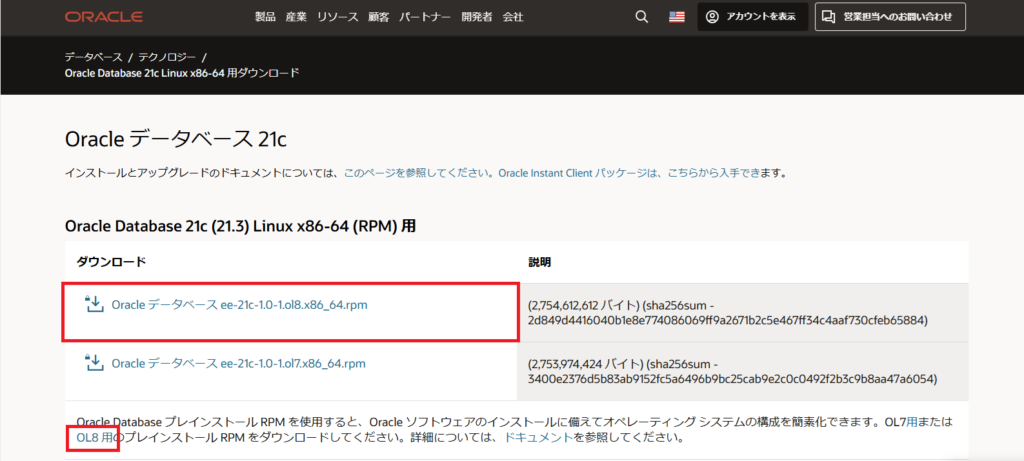
赤枠で囲った2か所をクリックして、以下の二つのファイルを入手します。
- oracle-database-preinstall-21c-1.0-1.el8.x86_64.rpm
- oracle-database-ee-21c-1.0-1.ol8.x86_64.rpm
※ファイルのダウンロードにはOracleにアカウントを登録する必要があります。
Oracle Databaseをインストールする
以下のOracle公式ドキュメントを参考に、Oracle Databaseをインストールします。

Database Installation Guide
docs.oracle.com
rpmでインストールするので以下を参考にします。

Database Installation Guide
Perform the following steps to install and configure Oracle Database using RPM packages.
docs.oracle.com
以下がインストールされていることを確認します。
bc
binutils
compat-openssl10
elfutils-libelf
glibc
glibc-devel
ksh
libaio
libXrender
libX11
libXau
libXi
libXtst
libgcc
libnsl
libstdc++
libxcb
libibverbs
make
policycoreutils
policycoreutils-python-utils
smartmontools
sysstat
Database Installation Guide
Use this information to check supported Oracle Linux 8 distributions.
docs.oracle.com
まず、ダウンロードしたrpmファイルを/tmp配下に配置します。
- oracle-database-preinstall-21c-1.0-1.el8.x86_64.rpm
- oracle-database-ee-21c-1.0-1.ol8.x86_64.rpm
次に以下のコマンドを実行してrpmファイルからOracle Databaseをインストールします。
cd /tmp
yum -y localinstall oracle-database-preinstall-21c-1.0-1.el8.x86_64.rpm
yum -y localinstall oracle-database-ee-21c-1.0-1.ol8.x86_64.rpm